


AI-based assistants improve the user experience and reduce support costs. But implementing them involves a lot of routine technical work, like connecting different LLMs and implementing tool calling. Hashbrown takes this work off our hands. The open-source project, supported by two well-known figures in the Angular community, supports all relevant model providers such as Gemini (Google), GPT (OpenAI), Azure (Microsoft), and Llama (Meta).
This article shows how to extend an existing Angular application with Hashbrown to include a chat assistant. The source code for the demo app is available on GitHub.
Sample application
This sample application is the flight search, which I’ll use to demonstrate several Angular features. Figure 1 shows the chat window that can be displayed on the right-hand side with an example chat history.
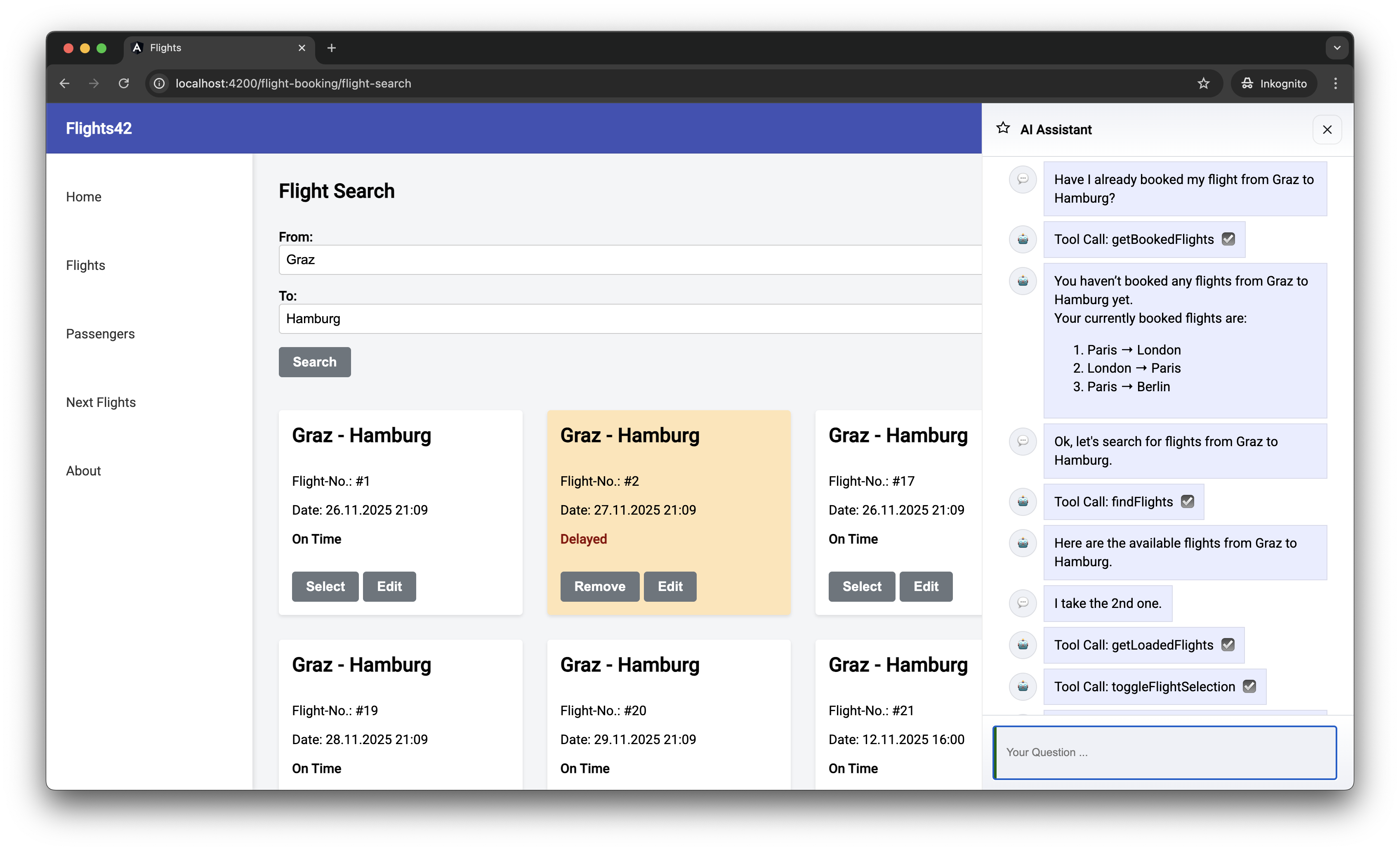
Fig. 1: Example application
As this chat history shows, the assistant can request additional data and trigger actions in the application as needed. This is made possible by tool calling: the LLM prompts the app to perform a specific function and return the results. These tool calls appear in the chat history as requested by the LLM, with the parameters { from: ‘Graz’, to: ‘Hamburg’ } for findFlights omitted.
While chat messages such as Tool Call: findFlights inform developers about internal processes, this information is likely to be confusing for end users. So it makes sense to translate this technical information into something like Load flights from Graz to Hamburg.
iJS Newsletter
Join the JavaScript community and keep up with the latest news!
Setting up Hashbrown
To use Hashbrown, we need a few npm packages:
npm install @hashbrownai/{core,angular,google}
The @hashbrown/angular package includes an Angular-based API for the core framework-agnostic library. A framework binding for React is also currently available. The @hashbrown/google package provides access to Google’s Gemini models. Hashbrown offers additional packages for other model families (such as @hashbrown/openai).
For programmatic access to LLMs, the application needs an API key, which is usually linked to a paid license. However, Google’s Gemini has a comprehensive free package for testing purposes. An API key can be generated in Google AI Studio with just a few clicks. The required menu item is available in the dashboard.
To prevent the API key from being published, it must not be used directly in the Angular front end. Instead, use a very narrow back end that serves as an intermediary between the front end and LLM (Listing 1).
Listing 1
// Taken from hasbrown.dev

import express from 'express';
import cors from 'cors';
import { Chat } from '@hashbrownai/core';
import { HashbrownGoogle } from '@hashbrownai/google';

const host = process.env['HOST'] ?? 'localhost';
const port = process.env['PORT'] ? Number(process.env['PORT']) : 3000;

const GOOGLE_API_KEY = process.env['GOOGLE_API_KEY'];
if (!GOOGLE_API_KEY) {
  throw new Error('GOOGLE_API_KEY is not set');
}

const app = express();

app.use(cors());
app.use(express.json());

app.post('/api/chat', async (req, res) => {
  const completionParams = req.body as Chat.Api.CompletionCreateParams;

  const response = HashbrownGoogle.stream.text({
    apiKey: GOOGLE_API_KEY,
    request: completionParams,
    transformRequestOptions: (options) => {

      options.model = 'gemini-2.5-flash';

      options.config = options.config || {};
      options.config.systemInstruction = `
      You are Flight42, an UI assistent that helps passengers with finding flights.

      - Voice: clear, helpful, and respectful.
      - Audience: passengers who want to find flights or have questions about booked flights.

      Rules:
      - Only search for flights via the configured tools
      - Never use additional web resources for answering requests
      - Do not propose search filters that are not covered by the provided tools
      - Do not propose any further actions
      - Provide enumerations as markdown lists
      `;

      return options;
    },
  });

  res.header('Content-Type', 'application/octet-stream');

  for await (const chunk of response) {
    res.write(chunk);
  }

  res.end();
});

app.listen(port, host, () => {
  console.log(`[ ready ] http://${host}:${port}`);
});
The implementation of this backend, which was taken in part from the Hashbrown documentation, expects the API key to be stored in the GOOGLE_API_KEY environment variable. On MacOS and Linux, this can be done with:
export GOOGLE_API_KEY=abcde...
And on Windows with:
set GOOGLE_API_KEY=abcde...
With transformRequestOptions, the backend can supplement or override the options set by the frontend—an important mechanism, as these settings have direct cost implications. In the example, the backend enforces the inexpensive all-round model gemini-2.5-flash and defines a system instruction that strictly limits the model to flight searches. This prevents users from consuming expensive LLM resources for unrelated queries.
Before overwriting, the frontend’s original values are stored in model and systemInstructions. This allows controlled negotiation. At the user’s request, the server can switch to a more powerful (but more expensive) model in selected cases or adjust the system instructions.
When the Angular application is started, this minimal server’s URL is configured via provideHashbrown (Listing 2).
Listing 2
import { provideHashbrown } from '@hashbrownai/angular';
[…]

bootstrapApplication(AppComponent, {
  providers: [
    provideHttpClient(),

    […]

    provideHashbrown({
      baseUrl: 'http://localhost:3000/api/chat',
      middleware: [
        (req) => {
          console.log('[Hashbrown Request]', req);
          return req;
        }
      ]
    }),
  ],
});
The optional middleware specified here logs all requests to the server on the JavaScript console. These messages give us a better understanding of how such systems work and also help with troubleshooting.
Chatting with the AI of your choice
Hashbrown provides several implementations of Angular’s Resource API for chatting with the LLM. For our purposes, we’ll use chatResource (Listing 3).
Listing 3
@Component({ … })
export class AssistantChatComponent {

  […]
  message = signal('');

  chat = chatResource({
    model: 'gemini-2.5-flash',
    system: `
      You are Flight42, an UI assistant that helps passengers with finding flights.
      […]
    `,
    tools: [
      findFlightsTool,
      toggleFlightSelection,
      showBookedFlights,
      getBookedFlights,
      […]
    ],
  });

  submit() {
    const message = this.message();
    this.message.set('');
    this.chat.sendMessage({ role: 'user', content: message });
  }

  […]
}
The chatResource provides the stateless LLM with the complete chat history for each request. This allows the model to refer to previous statements. For example, if a conversation revolves around flight #4711, the LLM recognizes what is meant by “this flight.”
The chatResource also supports tool calling. The tools property provides the model with all the functionalities provided by the front end, like findFlights for flight searches. The technical implementation of the tools can be found below. The value of the chatResource contains the chat history to be displayed (Listing 4).
Listing 4
@for (message of chat.value(); track $index) {
<article class="msg assistant">
  <div class="avatar">{{ icons[message.role] }}</div>
  <div>
    <div class="bubble">
      {{ message.content }}

      @if (message.role === 'assistant') {
        @for(toolCall of message.toolCalls; track toolCall.toolCallId) {
          <div [title]="toolCall.args | json">
            Tool Call: {{ toolCall.name }}
          </div>
        }
      }
    </div>
  </div>
</article>
}
The role property specifies who sent the chat message. For example, the value assistant indicates messages from the LLM, while user indicates messages from the front-end user. Messages from the LLM can also contain requests for tool calls, which are also presented in the template shown. Each tool call refers to the name of the desired tool (e.g., findFlights) and the arguments to be passed (e.g., { from: ‘Graz’, to: ‘Hamburg’ }).
iJS Newsletter
Join the JavaScript community and keep up with the latest news!
Providing tools
The tools provided are objects that the application creates with the createTool function (Listing 5).
Listing 5
import { createTool } from '@hashbrownai/angular';
import { s } from '@hashbrownai/core';
[…]

export const findFlightsTool = createTool({
  name: 'findFlights',
  description: `
  Searches for flights and redirects the user to the result page where the found flights are shown.

  Remarks:
  - For the search parameters, airport codes are NOT used but the city name. First letter in upper case.
  `,
  schema: s.object('search parameters for flights', {
    from: s.string('airport of departure'),
    to: s.string('airport of destination'),
  }),
  handler: async (input) => {
    const store = inject(FlightBookingStore);
    const router = inject(Router);

    store.updateFilter({
      from: input.from,
      to: input.to,
    });

    router.navigate(['/flight-booking/flight-search']);
  },
});
The tool name must be unique and comply with the model specifications. Here’s a practical rule of thumb: anything that is permitted as a variable name in TypeScript should also work here. The LLM uses the description to decide if the tool is relevant for the current task. The schema defines the arguments that the model must pass—in the example, an object with the search parameters from and to. Here the LLM is guided by the stored textual descriptions.
Hashbrown uses its own schema language, Skillet, to define this structure. It’s similar to the Zod library, but is reduced to constructs that reliably support LLMs. Future Hashbrown versions will also support JSON Schema and bridging to Zod.
The handler implements the tool: it receives the object defined in the schema and delegates the task to the system logic, such as the store or the router. Handlers can also return values to the model, like the getLoadedFlights tool (Listing 6).
Listing 6
export const getLoadedFlights = createTool({
  name: 'getLoadedFlights',
  description: `Returns the currently loaded/ displayed flights`,
  handler: () => {
    const store = inject(FlightBookingStore);
    return Promise.resolve(store.flightsValue());
  },
});
The return value is not formally described in Skillet—the model accepts any form of response. If the front end wants to provide the model with information about the structure of the delivered result, this can be done as free text in the description field.
iJS Newsletter
Join the JavaScript community and keep up with the latest news!
Under the hood
A look at the messages sent to the LLM shows how tool calling works (Listing 7):
- Hashbrown sends the user’s text search query in the user role to the model.
- The model responds in the assistant role with a tool call. This includes the name of the tool and the arguments to be passed.
- Hashbrown triggers the tool, which handles the search and route change.
- Hashbrown reports back in the tool role that the tool call has been completed. If the tool had returned a result, Hashbrown would include it in this message.
- The model responds in the assistant role.
To ensure that the LLM is aware of the tools offered, these are transferred together with metadata in the tools section at the end. Here, you’ll find textural descriptions stored in the source code and the schema definitions of expected arguments.
Listing 7
{
  "model": "gpt-5-chat-latest",
  "system": "You are Flight42, an UI assistant [...]",
  "messages": [
    [...],
    {
      "role": "user",
      "content": "Ok, let's search for flights from Graz to Hamburg."
    },
    {
      "role": "assistant",
      "content": "",
      "toolCalls": [
        {
          "id": "call_AeFJ3xsnNw29EoQVo7hR9Qtu",
          "index": 0,
          "type": "function",
          "function": {
            "name": "findFlights",
            "arguments": "{\"from\":\"Graz\",\"to\":\"Hamburg\"}"
          }
        }
      ]
    },
    {
      "role": "tool",
      "content": {
        "status": "fulfilled"
      },
      "toolCallId": "call_AeFJ3xsnNw29EoQVo7hR9Qtu",
      "toolName": "findFlights"
    },
    {
      "role": "assistant",
      "content": "Here are the available flights [...]",
      "toolCalls": []
    }
  ],
  "tools": [
    {
      "description": "Searches for flights [...]",
      "name": "findFlights",
      "parameters": {
        "$schema": "http://json-schema.org/draft-07/schema#",
        "type": "object",
        "properties": {
          "from": {
            "type": "string",
            "description": "airport of departure"
          },
          "to": {
            "type": "string",
            "description": "airport of destination"
          }
        },
        "required": [
          "from",
          "to"
        ],
        "additionalProperties": false,
        "description": "search parameters for flights"
      }
    },
    [...]
  ]
}
For a better visualization, Figure 2 shows the process as a sequence diagram. This diagram also shows the backend, which allows the frontend to access the model.
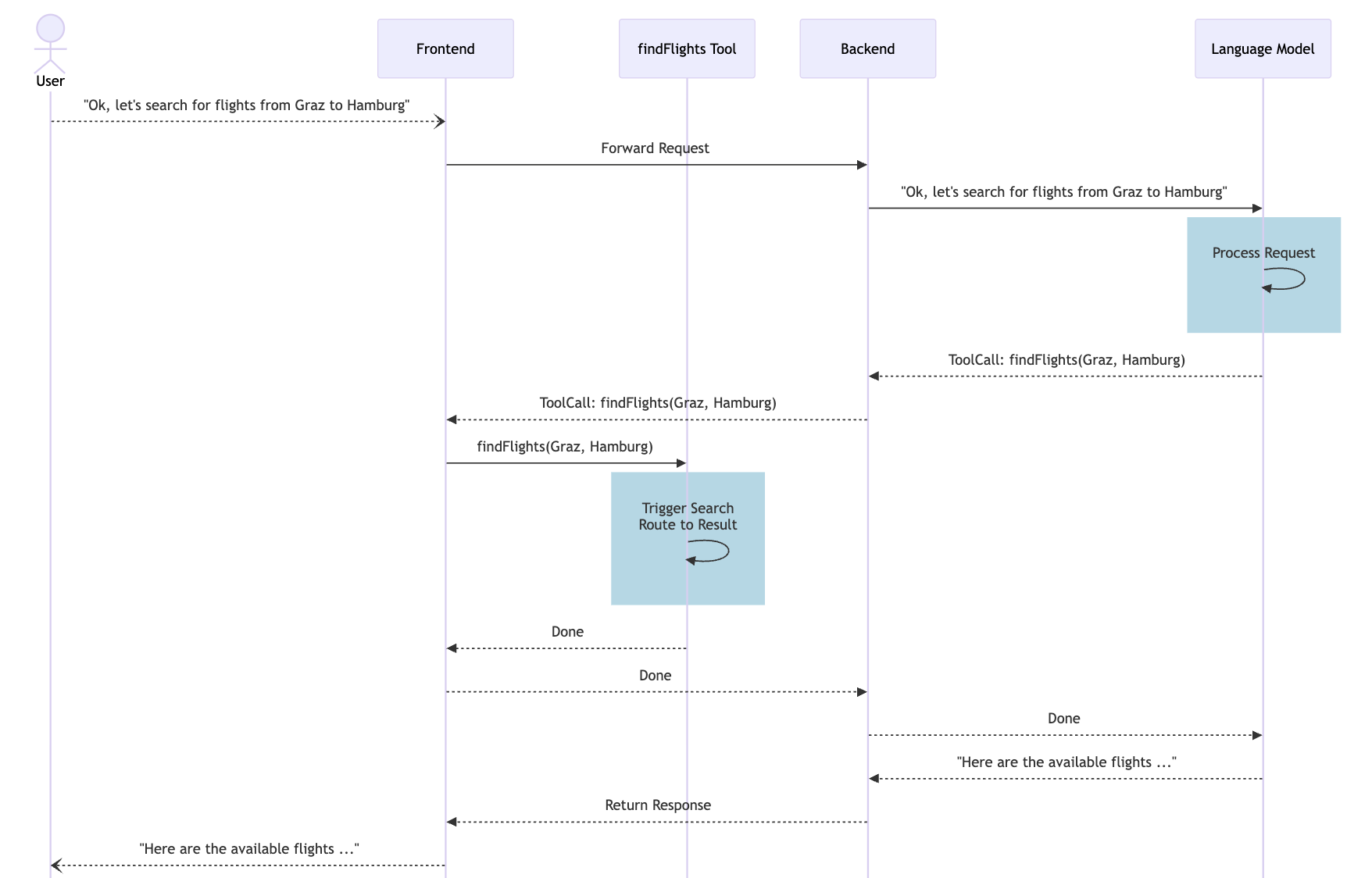
Fig. 2: Message history with Tool Calling
Conclusion
Hashbrown makes it easy to add chat-based AI assistants to front-end applications. It handles complex tasks like LLM integration and tool calling, allowing developers to focus on actual business benefits. In just a few steps, you can create an assistant that controls user interactions, triggers application functions, and responds contextually.
In practice, it’s important to note that LLMs do not work deterministically—the same query can lead to slightly different results. It’s also worth refining tool descriptions step-by-step and testing them with typical sample queries to achieve reliable interaction between the model and the application.
🔍 Frequently Asked Questions (FAQ)
1. What is Hashbrown in frontend AI integration?
Hashbrown is an open-source framework that simplifies adding AI assistants to frontend applications. It abstracts routine work such as connecting to LLM providers and implementing tool calling, so teams can focus more on application behavior and user value.
2. Which AI model providers does Hashbrown support?
The article states that Hashbrown supports major model providers including Gemini from Google, GPT from OpenAI, Azure from Microsoft, and Llama from Meta. It also mentions framework bindings for Angular and React, with Angular used throughout the example.
3. Why should an Angular frontend use a backend for LLM access?
The backend acts as a narrow intermediary so the API key is not exposed in the frontend. In the example, it also enforces cost-relevant settings such as the selected model and system instruction, which helps prevent misuse and keeps the assistant limited to the intended use case.
4. How is Hashbrown configured in an Angular application?
The Angular app configures Hashbrown with provideHashbrown, including the backend baseUrl and optional middleware. In the article, middleware is used to log requests to the JavaScript console, which helps developers understand request flow and troubleshoot issues.
5. What does chatResource do in Hashbrown?
chatResource gives Angular applications a way to chat with an LLM while preserving the full conversation history for each request. This allows the model to interpret follow-up references in context, such as understanding that “this flight” refers to a previously discussed flight.
6. How does tool calling work in Hashbrown?
The article describes a sequence where the user sends a message, the model responds with a tool call, Hashbrown executes the tool, and the result is reported back to the model before the assistant replies again. This lets the LLM trigger frontend functions such as searching for flights or navigating the user to another view.
7. How are tools defined in Hashbrown?
Tools are created with createTool and include a unique name, a description, a schema for input arguments, and a handler. The description helps the model decide when a tool is relevant, while the handler connects the request to application logic such as routing or store updates.
8. What input format does Hashbrown use for tool parameters?
Hashbrown uses its own schema language called Skillet to define tool inputs. The article describes Skillet as similar to Zod but reduced to constructs that reliably support LLMs, and it notes that future versions are expected to support JSON Schema and Zod bridging as well.
9. Can Hashbrown tools return values to the model?
Yes. The article shows that tool handlers can return results, such as a list of currently loaded flights, and Hashbrown can pass that result back to the model in the tool-response step of the message flow.
10. What should teams keep in mind when using Hashbrown in production?
The article emphasizes that LLM behavior is not deterministic, so the same prompt can produce slightly different results. It recommends refining tool descriptions iteratively and testing them with realistic sample queries to achieve more reliable interactions between the model and the application.