


We’ve been hearing a lot of noise about AI agents lately. The industry promise is huge: autonomous or semi-autonomous systems executing complex workflows on our behalf. But if you’re a front-end architect or a senior developer who has actually tried to let an AI agent navigate a modern web application, you’ve already hit the wall. The reality under the marketing hood is that agentic actuation is incredibly brittle.
When an AI agent relies on standard web browsing modes, it’s essentially just an unimpressive scraper. It takes screenshots, parses messy, deeply nested DOM trees, and tries to guess what a button does based on heuristics, ARIA labels, ids, or CSS classes. The moment your app triggers a client-side layout shift, updates a component in your design system, or handles an asynchronous state change, the agent falls over. It gets stuck in loops or, worse, hallucinates data and submits half-baked forms.
What if our web applications didn’t have to sit passively while an external AI agent tries to brute-force its way through a user interface designed exclusively for human eyes? What if we could design interfaces that explicitly, cleanly, and securely tell AI agents exactly what they can do, how to interact with them, and what structured data they expect? This is exactly what WebMCP (Web Model Context Protocol) aims to solve.
Recently proposed as a new web standard and available as an early preview in Google Chrome, WebMCP is a game-changer for front-end engineering in the AI era. It allows us, front-end developers, to bridge the gap between our web applications and the rapidly expanding ecosystem of AI agents through a clean architecture pattern: progressive enhancement for AI.
In this article, we are going to explore the underlying mechanics of WebMCP, evaluate why it is an essential tool for the modern front-end stack, analyze its core architecture, and walk through a step-by-step implementation of both its imperative and declarative options.
Before you continue…
The reading list you'd build – if you had time.
The reads you'd find if you had time
Experts you can actually ask
Deep dives worth your weekend
Past conferences, ready when you are

The Fragility of Agentic Actuation
Before we can appreciate WebMCP, we must first deeply understand the architectural limitations of how AI agents interact with the web today.
In the current landscape, when an LLM-backed agent is tasked with completing an action on a website, such as booking a flight, filling out a complex expense form, or running an application diagnostic, it relies on a process called actuation. Actuation is the act of an agent simulating manual user interactions like mouse movements, clicks, scrolls, and keyboard inputs.
To accomplish this, the agent is usually fed a serialized representation of the active page. This might be a raw HTML string, a simplified accessibility tree, or a sequence of viewport screenshots. The agent processes this data, predicts the coordinates or the DOM selectors of the element it needs to interact with, and executes the simulated input.
This approach suffers from several catastrophic architectural flaws:
1. High semantic noise: web pages are packed with elements that are critical for human visual comprehension and brand identity but represent pure noise to an LLM. Navigation menus, promotional banners, sidebars, tracking scripts, and complex CSS layouts aren’t supposed to be used by an agent. The agent wastes valuable token context window space filtering out this layout noise just to find a single form field. That means this process is costly.
2. Contextual misinterpretation: Human-first user interfaces rely heavily on visual cues and micro interactions. A date picker component might look like a simple input field to a raw HTML parser, but interacting with it requires clicking a tiny calendar icon, navigating months via pagination arrows, and selecting a specific table cell in the picker panel. An AI agent trying to actuate this component directly through simulated clicks can break the component’s internal state.
3. State desynchronization: Single Page Applications (SPAs) built with modern frameworks like React, Next.js, or Vue manage state asynchronously. When an agent clicks a button that triggers a client-side route transition or a delayed state mutation, the agent may attempt its next action before the DOM has finished re-rendering, leading to target selection errors and broken flows.
4. Lack of determinism: LLMs are inherently probabilistic. If you ask an agent to fill out a registration form ten times using raw UI actuation, there is a statistically significant chance that it will misinterpret a field label or format a piece of data incorrectly on at least one of those attempts. In enterprise, financial, or healthcare applications, a 90% success rate is an absolute failure. We require 100% determinism when executing transactions.
WebMCP tries to solve all the above. Instead of forcing the agent to infer intent from presentation, WebMCP allows the presentation layer to explicitly declare its capabilities directly to the browser runtime.
What is WebMCP?
WebMCP is an adaptation and extension of the broader Model Context Protocol (MCP) originally created by Anthropic and open-source contributors. While standard MCP focuses on connecting AI models to local development tools, databases, and enterprise secure environments via transport layers like SSE (Server-Sent Events) or stdio, WebMCP brings this protocol natively into the browser.
WebMCP exposes a structured, highly secure bridge between the web page running in a tab and the underlying AI assistant operating at the browser level. It transforms your web application from a static document that must be visually scraped into a dynamic, queryable, and executable engine of tools.
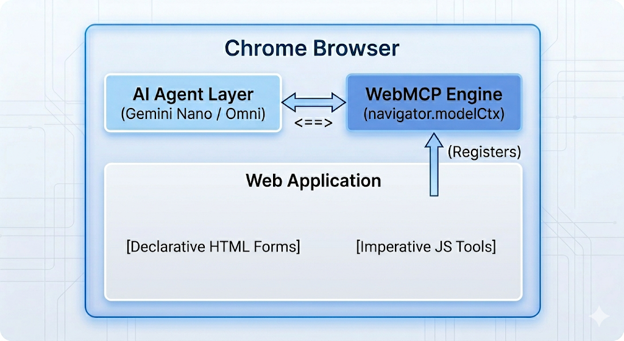
When a web page leverages WebMCP, it registers specific capabilities with the browser’s model context. The agent no longer needs to guess how to perform a task. It simply looks at the list of registered tools, reads their strictly typed definitions, and invokes them using deterministic JSON arguments.
The Three Pillars of WebMCP
To provide a robust alternative to raw UI actuation, WebMCP establishes three core pillars:
1. Standardized discovery: when a user navigates to a website, an agent operating within or alongside the browser needs a uniform way to query what operations are available on that specific page. WebMCP establishes a native browser API (navigator.modelContext) that acts as a registry. As soon as the page bootstraps, your application registers its tools. The browser can immediately communicate these capabilities to the underlying AI model without requiring the model to parse a single line of your application’s visual HTML layout.
2. Strict JSON schemas: one of the primary causes of agent failure is data formatting mismatch. For example, an agent inputting a full name into a field that strictly expects a split first and last name or sending an ISO timestamp to a custom input field expecting MM/DD/YYYY format.
WebMCP mandates that every registered tool must define an inputSchema adhering to the standard JSON Schema specification. This schema outlines:
- The exact properties the tool accepts
- The explicit primitive data types
- Enums restricting values to valid states
- Formats (such as date, email, or URI)
- Required vs. optional parameters
By validating the agent’s intended arguments against this JSON Schema before executing any code, WebMCP completely mitigates structural hallucinations. The LLM is forced to format its parameters precisely as your application logic requires.
3. Shared execution context & visual state: unlike server-to-server API calls, WebMCP tools execute directly inside the active browsing context of the user’s current tab. This is a critical distinction. When an agent calls a WebMCP tool, the tool’s handler runs your local client-side JavaScript.
This means the tool can directly read your application’s in-memory state, manipulate the DOM, update form components, or trigger client-side routers. Because this execution happens visually on screen, the human user retains full visibility. They can watch the application update in real time, preserving the human in the loop trust model without abandoning your application’s carefully crafted UI.
WebMCP vs. Standard MCP vs. Actuation
To fully understand where WebMCP fits into your tech stack, let’s compare it using some critical vectors against traditional UI actuation and standard backend Model Context Protocols.
| Feature | Traditional UI Actuation | Standard MCP (Backend) | WebMCP (Browser Native) |
|---|---|---|---|
| Execution Environment | External Agent (Headless/Virtual Display) | Server-side Node/Go/Python Runtime | Client-side Browser Tab Sandbox |
| Interface Medium | DOM Selectors, Coordinates, Screenshots | Secure APIs, DB Connections, File Systems | JavaScript Event Handlers, HTML Form Fields |
| User Visibility | Hidden from user (unless sharing the screen) | Completely invisible backend processing | Visibly executed on-screen within active UI |
| State Access | Purely visual / Serialized DOM scraping | Backend database or session records | Live, in-memory client-side application state |
| Reliability | Low (Vulnerable to layout and styling shifts) | High (Direct program-to-program APIs) | High (Direct program-to-agent contract) |
| Implementation Complexity | Zero on web app; extremely high on agent | High backend setup, authentication, proxying | Low-to-moderate frontend progressive enhancement |
The Two Implementation Models: Declarative vs. Imperative
The Chrome implementation of the WebMCP specification recognizes that web development scales from simple, static semantic documents to highly interactive, state-driven single-page applications. To accommodate this spectrum, it offers two distinct APIs:
1. The Declarative API: It is designed for fast, low-overhead integration. It allows you to transform standard HTML < form > elements into WebMCP tools purely by adding semantic attributes.
You don’t have to write custom JavaScript registries or manually handle schema extraction. The browser parses the form’s inputs, automatically derives a JSON Schema based on HTML5 validation attributes, and exposes it to the agent layer. When the agent invokes the tool, the browser automatically fills out the form fields and triggers the submit event.
2. The Imperative API: It is the powerhouse built for professional web developers handling complex UIs, client-side routing, state management libraries, and custom component design system libraries.
Using standard JavaScript via navigator.modelContext.registerTool(), you explicitly write code that maps the agent’s intent directly to your internal application logic, bypassing DOM interaction altogether if desired and executing clean state mutations.
Setting Up Your WebMCP Development Environment
Because WebMCP is currently tracking through the standards process and is actively under experimental origin trials in Google Chrome, you must explicitly prepare your development environment to recognize and execute the APIs.
Step 1: Flag Activation
- Launch Google Chrome
- In the omnibox, navigate to: chrome://flags/#enable-webmcp-testing
- Locate the WebMCP Testing flag and toggle its state to Enabled.

- Relaunch the browser.
Step 2: Incorporating the Permissions Policy
WebMCP features a robust, built-in security perimeter gated by a dedicated Permissions Policy called tools. By default, the policy resolves to self. This means that tool discovery and execution are permitted inside top-level browsing contexts and same-origin iframes. It strictly blocks untrusted, cross-origin third-party iframes from registering tools that could hijack an agentic session.
If your architecture explicitly demands hosting a WebMCP-enabled application inside a cross-origin iframe (for instance, an embedded booking widget or a white-labeled payment gateway), you must explicitly allow the context via the allow attribute:
< iframe src=”https://trusted-widget.sparxys.com” allow=”tools”></ iframe>
Step 3: Installing the Inspector Subsystem
To debug and verify your application schemas without needing to integrate a massive external agent orchestration framework, you should utilize the Model Context Tool Inspector Extension available via the Chrome Developer ecosystem.
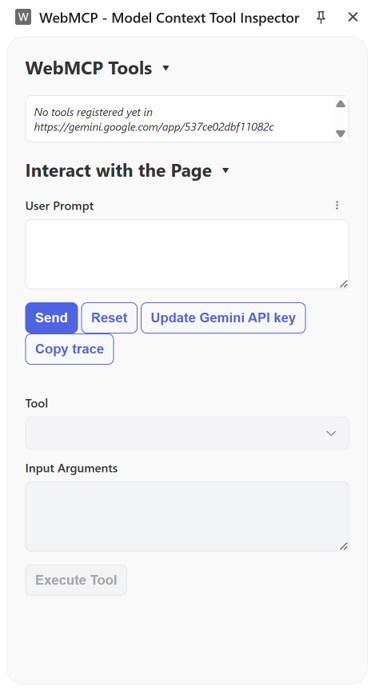
This tool introduces an inspector panel that accesses navigator.modelContext, instantly listing all registered imperative and declarative tools on the active page. It includes a natural language prompting playground backed by locally or cloud-hosted Gemini models (such as Gemini Nano), letting you input natural text to verify that the agent cleanly extracts arguments and maps them to your schemas.
Implementing the Imperative API
The Imperative API is where real architectural control lives. If you’re building a single-page application with complex state boundaries, you don’t want the agent touching the DOM at all. You want it to talk directly to your logic. Let’s look at how to register a tool using navigator.modelContext.registerTool by building a small usage example with the imperative API. In this example, we will create a small booking form that includes the destination, travel month, and number of guests.
Step 1: Constructing the Semantic HTML Interface
Create an index.html file.
<!DOCTYPE html>
<html lang="en">
<head>
    <meta charset="UTF-8">
    <title>Hotel Search - Imperative WebMCP</title>
    <link rel="stylesheet" href="booking.css">
</head>
<body>

<div class="booking-form">
    <div class="form-group">
        <label>Destination</label>
        <input type="text" id="dest" value="Orlando">
    </div>
    <div class="form-group">
        <label>Travel Month</label>
        <input type="month" id="dates" value="2026-08">
    </div>
    <div class="form-group">
        <label>Guests</label>
        <input type="number" id="guests" value="5">
    </div>
    <button onclick="executeSearch()">Search</button>
</div>

<div id="results"></div>

<script src="scripts.js"></script>
</body>
</html>
Step 2: Authoring the Imperative Registration Script
Now, let’s craft scripts.js. Pay careful attention to how we construct our JSON schema. We want the agent to pass three strictly typed fields: destination, dates, and guests.
function updateUI(dest, dates, guests) {
    const output = `Searching for ${guests} guests in ${dest} for ${dates}...`;
    const render = () => document.getElementById('results').innerText = output;

    if (document.startViewTransition) {
        document.startViewTransition(render);
    } else {
        render();
    }
}

function executeSearch() {
    const dest = document.getElementById('dest').value;
    const dates = document.getElementById('dates').value;
    const guests = document.getElementById('guests').value;
    updateUI(dest, dates, guests);
}

// WebMCP Imperative Registration
if ('modelContext' in navigator) {
    navigator.modelContext.registerTool({
        name: 'searchHotel',
        description: 'Search for hotel room availability by destination, dates, and guest count.',
        inputSchema: {
            type: 'object',
            properties: {
                destination: { type: 'string' },
                dates: { type: 'string' },
                guests: { type: 'number' }
            },
            required: ['destination', 'dates', 'guests']
        },
        execute: async (params) => {
            updateUI(params.destination, params.dates, params.guests);

            // Update visual inputs to reflect agent's actions
            document.getElementById('dest').value = params.destination;
            document.getElementById('dates').value = params.dates;
            document.getElementById('guests').value = params.guests;

            return JSON.stringify({ status: 'success', summary: `Search initiated for ${params.destination}` });
        }
    });
}
Implementing the Declarative API
The imperative API provides complete program control, but it requires you to manually maintain schema layouts in synchronization with your state architecture. For standard text entry pipelines, data processing forms, or support desks, the declarative API is faster and cleaner.
Let’s see how we can change the previous imperative example to use the declarative way.
Writing the Annotated Declarative Markup
By using standard HTML attributes and applying the webmcp-tool configuration layout, we instruct the Chrome parsing layout to handle the registration on our behalf.
Create a separate index file called declarative.html:
<!DOCTYPE html>
<html lang="en">
<head>
    <meta charset="UTF-8">
    <title>Hotel Search - Declarative WebMCP</title>
    <link rel="stylesheet" href="booking.css">
</head>
<body>

<form class="booking-form"
      id="searchForm"
      toolname="searchHotel"
      tooldescription="Search for hotel room availability"
      toolautosubmit>

    <div class="form-group">
        <label for="dest">Destination</label>
        <input type="text" name="destination" id="dest" value="Orlando"
               toolparamdescription="The city to search for hotels in">
    </div>
    <div class="form-group">
        <label for="dates">Travel Month</label>
        <input type="month" name="dates" id="dates" value="2026-08"
               toolparamdescription="The month and year of travel">
    </div>
    <div class="form-group">
        <label for="guests">Guests</label>
        <input type="number" name="guests" id="guests" value="5"
               toolparamdescription="Total number of guests traveling">
    </div>
    <button type="submit">Search</button>
</form>

<div id="results"></div>

<script>
    const form = document.getElementById('searchForm');

    form.addEventListener('submit', (e) => {
        e.preventDefault();
        const data = new FormData(form);
        const outputMsg = `Searching for ${data.get('guests')} guests in ${data.get('destination')} for ${data.get('dates')}...`;

        const updateUI = () => document.getElementById('results').innerText = outputMsg;

        if (document.startViewTransition) {
            document.startViewTransition(updateUI);
        } else {
            updateUI();
        }

        // The agentInvoked is true if the browser's agent triggered the form
        if (e.agentInvoked) {
            e.respondWith(Promise.resolve(JSON.stringify({
                status: 'success',
                message: outputMsg
            })));
        }
    });

    // Listen for agent actuation events for debugging/logging
    window.addEventListener('toolactivated', ({ toolName }) => {
        console.log(`Agent activated WebMCP tool: ${toolName}`);
    });
</script>
</body>
</html>
Deconstructing the Declarative Engine Conversion
What’s elegant here is how much work the browser handles under the hood. By simply using native HTML5 validation attributes and standard markup, WebMCP automatically infers the types, constraints, and enums, exposing a perfectly structured JSON schema to the agent without a single line of manual JavaScript mapping:
  {
    "name": "searchHotel",
    "description": "Search for hotel room availability",
    "inputSchema": {
      "type": "object",
      "properties": {
        "destination": {
          "type": "string",
          "description": "The city to search for hotels in"
        },
        "dates": {
          "type": "string",
          "format": "^[0-9]{4}-(0[1-9]|1[0-2])$",
          "description": "The month and year of travel"
        },
        "guests": {
          "type": "number",
          "multipleOf": 1,
          "description": "Total number of guests traveling"
        }
      },
      "required": []
    }
  }
When the agent attempts to run searchHotel, the browser injects the values safely into the inputs, fires browser-native validation checks to ensure the data matches, and calls the submit event.
Architectural Deep Dive: Security and Data Isolation Boundaries
When discussing protocols that allow external systems to invoke operations within an active web page session, security must be one of our top architectural concerns. If malicious entities could inject tools or call unauthorized actions, WebMCP would represent a massive security vulnerability. The standard addresses this through several core security boundaries:
1. Same-Origin boundary preservation: WebMCP tools are strictly tied to the security context of the origin that registered them. A tool registered by https://secure.sparxys.com cannot be discovered or invoked by an agent looking at a tab pointed to https://attacker-compromised-site.io. The execution boundary honors standard DOM isolation.
2. Mandatory human-in-the-loop patterns: WebMCP doesn’t grant automated agents blind, blanket approval to execute any arbitrary code path in headless background threads. As the browser window must remain active and visible (headless state execution is blocked by the spec design), a user can witness every single manipulation.
For highly sensitive actions such as clicking a final purchase confirmation button, transferring funds, changing root IAM configurations, or modifying passwords, the architecture specification advises embedding standard user confirmation modals inside your JavaScript handler code.
handler: async (args) => {
    const userConsent = await showCustomConfirmationModal("Are you sure you want to authorize this transaction?");
    if (!userConsent) {
        return { success: false, error: "USER DENIED CONSENT" };
    }
    // Proceed with operational routine...
}
This structural safety constraint guarantees that an agent can gather parameters and streamline forms, but the final authorization remains strictly under the user’s control.
Performance Optimization and Memory Management in WebMCP Applications
Exposing structural tools directly inside client-side runtimes requires careful monitoring to avoid memory leaks, sluggish frame rates, and excessive CPU context switching, especially when building on modern SPA stacks like React or Next.js.
1. Avoid stale closure retainers: when registering an imperative tool via navigator.modelContext.registerTool inside a React hook or functional component lifecycle, ensure you clean up properly when components unmount. If you continuously re-register tools on every single re-render cycle, you will accumulate stale closures that retain heavy component state references in memory, leading to memory leaks.
// React useEffect example
useEffect(() => {
    if (!navigator.modelContext || !navigator.modelContext.registerTool) return;

    const abortController = new AbortController();

    navigator.modelContext.registerTool({
        name: "update_dashboard_filter",
        description: "Updates data viewing parameters.",
        inputSchema: { /* ... */ },
        handler: async (args) => {
            // Context execution parameters
        }
    }, { signal: abortController.signal });

    return () => {
        abortController.abort();
    };
}, [reactiveDependencyDependencies]);
2. Keep asynchronous handlers non-blocking: your handler code blocks the agent’s orchestration path until it resolves. If your handler must perform heavy computation, massive client-side data sorting, or wait for sluggish third-party API networks, hand off the tracking workload smoothly. Return a Pending status to the agent or step down execution priorities via requestIdleCallback to prevent locking the browser’s primary UI rendering thread.
Before you continue…
The reading list you'd build – if you had time.
The reads you'd find if you had time
Experts you can actually ask
Deep dives worth your weekend
Past conferences, ready when you are
Summary
The web is evolving. We are rapidly transitioning away from an era in which web browsers were used exclusively by humans interacting with visual point and click layouts. We are moving into a hybrid web ecosystem where human users are accompanied by highly specialized, context-aware AI agents designed to handle heavy operational lifting.
As senior front-end developers and software architects, our design philosophy must expand. We need to stop thinking about progressive enhancement merely to handle disabled JavaScript or slow mobile connections. We must treat agentic accessibility as a foundational element of the modern front-end engineering stack.
WebMCP gives us the exact blueprint we need to achieve this. By dedicating time to defining clean, strictly typed contracts through imperative registries and declarative HTML5 form layouts, we ensure our applications remain incredibly robust, highly performant, and perfectly discoverable in an increasingly agentic web ecosystem.
The spec is taking shape in real-time. Turn on the flags, test your forms with the inspector extension, and start thinking about your UI as an API.
Author
🔍 Frequently Asked Questions (FAQ)
1. What is WebMCP?
WebMCP, or Web Model Context Protocol, is a browser-native adaptation of the Model Context Protocol designed for web applications. It allows a web page to expose structured tools directly to AI agents so they can perform tasks without relying on brittle DOM scraping or simulated clicks.
2. Why do AI agents struggle with traditional web interfaces?
AI agents struggle with traditional web interfaces because they must infer intent from visual layouts, DOM structures, screenshots, labels, and coordinates. This approach is fragile when applications use dynamic layouts, asynchronous state updates, custom components, or single-page application routing.
3. How does WebMCP improve AI agent reliability?
WebMCP improves reliability by letting applications explicitly register available actions with the browser. Instead of guessing how to interact with a page, the agent can read structured tool definitions and invoke them with deterministic JSON arguments.
4. What are the three core pillars of WebMCP?
The three core pillars of WebMCP are standardized discovery, strict JSON schemas, and shared execution context with visual state. Together, these let agents discover available tools, validate inputs before execution, and operate inside the active browser tab.
5. How is WebMCP different from standard MCP?
Standard MCP usually connects AI models to backend systems, databases, local tools, or enterprise environments. WebMCP brings the protocol into the browser so agents can interact with client-side JavaScript, HTML forms, live UI state, and active web application sessions.