


In practice, Agentic AI often leads to tightly coupled systems: the UI and agent logic in the backend are directly interconnected and depend on each other. This complicates maintenance, reduces flexibility, and causes vendor lock-in. AG-UI solves this problem by defining a clear, message-based interface between the frontend and the agent. This results in a decoupled architecture independent of backend technologies and LLM providers.
The source code used for this can be found here on GitHub in the agentic branch.
Agentic AI and the Frontend
Our demo application can be used entirely without AI integration. However, if users get stuck or want to streamline workflows, they can activate a sidecar and chat with an LLM using a server-side agent (Fig. 1).
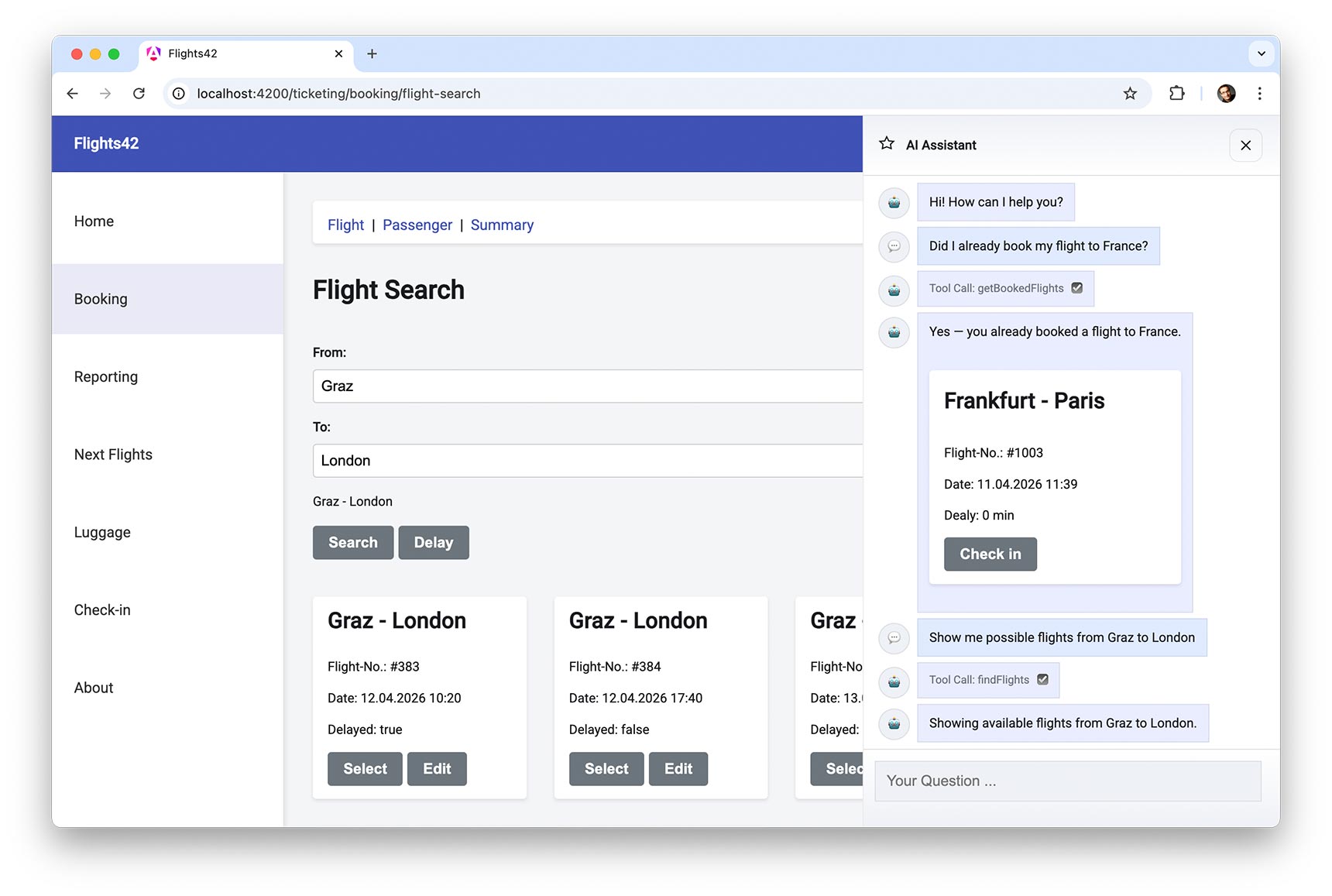
Fig. 1: Sample application
The LLM can utilize tools that the sidecar provides to answer questions. On the backend, it can access databases and it handles tasks related to stores, forms, and routing on the frontend.
The LLM can also select components from a catalog, which the Sidecar displays. It passes data determined by the tools to these components.
Let’s look at the two tools used in the example. getBookedFlights is a server-side tool that retrieves the current user’s flights. The findFlights tool initiates a flight search on the client side. It navigates to the page with the search form, fills it out, and triggers the search.
For transparency, it’s good practice to inform users about steps taken like tool calls. The example makes this very explicit by also outputting the internal tool names. In a business application, this would be phrased in slightly less technical terms. Instead of “Tool Call: getBookedFlights,” the sidecar could write “Determine booked flights…” in the chat history.
Besides the tool calls, the chat also displays textual responses and a flight map selected by the LLM. The sidecar passes the flight that will be displayed to this map. The Angular application accesses the agent via HTTP, which has access to one (or more) LLM(s) (Fig. 2). An agent client handles communication details, informing the agent about the client-side tools and components. The agent also maintains a list of server-side tools.
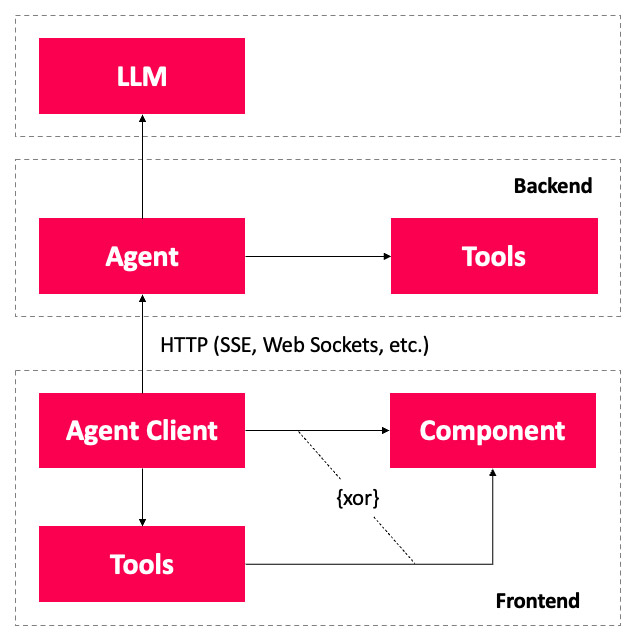
Fig. 2: Architecture
When the agent forwards the user’s request to the LLM, it also sends the collected information about server-side tools, client-side tools, and components. The LLM determines what additional data it needs and requests tool calls. The agent handles server-side tool calls and delegates client-side tool execution to the agent client. It reports its results back to the LLM, which continues processing its task.
To provide the final response to the query, the LLM returns free-form text. It can also send a JSON document specifying which components the sidecar should display. The values for these components’ inputs are also included in the JSON. Depending on the LLM’s capabilities, this JSON document can be a structured response or parameters passed to a client-side tool.
The structured response-also called Structured Output-is the cleaner solution from a semantic perspective. Many LLMs support a formal description of parameters for tool calls using JSON Schema. Because of this, using tool calling to display components is often the more pragmatic solution. This raises the question of how communication with the agent should be designed without creating too strong a coupling with the client. The AG-UI standard provides answers.
Before you continue…
The reading list you'd build – if you had time.
The reads you'd find if you had time
Experts you can actually ask
Deep dives worth your weekend
Past conferences, ready when you are

What is AG-UI?
To stay independent of server technologies and avoid vendor lock-in with individual LLM providers, the AG-UI standard defines the message types for communication between client and agent. The creators of CopilotKit, a convenient frontend SDK for developing AI-based assistants and sidecars, are behind the standard. Adapters now exist for virtually all well-known agent frameworks. At the time of writing, the AG-UI website listed the following supported frameworks:
- AG2
- Agno
- AWS Bedrock AgentCore
- AWS Bedrock Agents
- AWS Strands Agents
- Cloudflare Agents
- CrewAI
- Google ADK
- LangGraph
- LlamaIndex
- Mastra
- Microsoft Agent Framework
- OpenAI Agent SDK
- Pydantic AI
AG-UI defines messages exchanged between the client and the agent. These messages describe the transmission of text or tool calls along with their results, for example. Subsequent messages can provide further details based on information from previous messages. This forms the basis for streaming text and parameters for tool calls.
AG-UI is deliberately designed to be transport-agnostic, so it makes no assumptions about the underlying transport protocol. Typically, HTTP with Server-Sent Events (SSE) or WebSockets are used.
Message Types in AG-UI
For individual messages exchanged between the agent and the client, AG-UI defines types that can be subdivided into different categories. Table 1 shows a selection of message types that we’ll use in this article.
| Category | Message Type | Description |
|---|---|---|
| Lifecylce | RUN_STARTED | Starts a run that contains all the messages needed to answer a question. These messages include text messages and ones that describe tool calls. |
| RUN_FINISHED | Completes a run. | |
| RUN_ERROR | Reports an error for a run. | |
| Text Message | TEXT_MESSAGE_START | Start by sending a text message. |
| TEXT_MESSAGE_CONTENT | Provides (additional) parts of the text message. | |
| TEXT_MESSAGE_END | Ends a text message. | |
| Tool Call | TOOL_CALL_START | Initiates a tool call. |
| TOOL_CALL_ARGS | Provides (additional) parameters for the tool call. | |
| TOOL_CALL_END | Ends the tool call. | |
| TOOL_CALL_RESULT | Returns the result of a tool call. |
Table 1: Selected message types in AG-UI
According to the terminology, a run begins with a user’s question. It encompasses all messages that the agent sends in response. This includes messages related to tool calls, results of tool calls, and textual responses. For instance, two runs can be identified in Fig. 1 at the beginning. The first begins with the question about a flight to France, and the second with the search query for flights from Graz to London.
To enable streaming, AG-UI lets most information be split into multiple messages. Examples of this are the message types TEXT_MESSAGE_CONTENT and TOOL_CALL_ARGS. Multiple messages of these types can gradually provide text or additional arguments for a tool call.
The messages in Listing 1, which reflect the first run from Figure 1, show AG-UI usage.
Listing 1
{"type":"RUN_STARTED", "threadId":"f66a", "runId":"95e2"}

{"type":"TOOL_CALL_START", "toolCallId":"3PQX", "toolCallName":"getBookedFlights"}

{"type":"TOOL_CALL_ARGS", "toolCallId":"3PQX", "delta":"{}"}

{"type":"TOOL_CALL_END", "toolCallId":"3PQX"}

{"type":"TOOL_CALL_RESULT", "toolCallId":"3PQX", "content":"...JSON...", "role":"tool"}

{"type":"TEXT_MESSAGE_START","messageId":"d110","role":"assistant"}

{"type":"TEXT_MESSAGE_CONTENT","messageId":"d110","delta":"Yes - you already booked "}

{"type":"TEXT_MESSAGE_CONTENT","messageId":"d110", "delta":"a flight to France."}

{"type":"TEXT_MESSAGE_END","messageId":"d110"}

{"type":"TOOL_CALL_START", "toolCallId":"TjaS", "toolCallName":"showComponents"}

{"type":"TOOL_CALL_ARGS", "toolCallId":"TjaS", "delta":"...JSON..."}

{"type":"TOOL_CALL_END", "toolCallId":"TjaS"}

{"type":"RUN_FINISHED", "threadId":"f66a", "runId":"95e2"}
These messages describe a tool call for the server tool getBookedFlights and for the client tool showComponents, as well as a textual response. For readability, the IDs-which are typically GUIDs-have been truncated to 4 digits, and the JSON embedded in strings containing arguments and tool results is only hinted at. Thanks to the IDs, we can trace which initiated tool call the supplied arguments or logged results belong to.
To make sure that initial content can be displayed even during transmission, the agent splits its response into two text messages. In practice, this division is often even more granular. Similar to tool calls, messages that form a response together are assigned the same ID.
The two lifecycle messages that start and end the run contain the runId and a threadId. This is used to group all runs in a chat history.
Before you continue…
The reading list you'd build – if you had time.
The reads you'd find if you had time
Experts you can actually ask
Deep dives worth your weekend
Past conferences, ready when you are
AG-UI SDK
So that we don’t have to start from scratch, AG-UI comes with a protocol specification and with SDKs for TypeScript and Python. Many adapters for agent frameworks are built on top of these. The Microsoft Agent Framework comes with its own implementation to support AG-UI on the server side via C# as well. In addition, the official AG-UI repository also contains community implementations for other languages like Java and C++ and frameworks like Spring AI.
The official SDKs for TypeScript and Python support HTTP via Server-Sent Events: Each run triggers an HTTP request, and then the server-side agent gradually sends its response containing individual text messages and tool calls to the client. These messages can be encoded using JSON or, in binary format, via Protocol Buffers.
TypeScript SDK on the Server
To illustrate the server-side use of the TypeScript SDK, Listing 2 shows a simple hard-coded example that sends simple AG-UI-compliant messages without using a language model. To do this, the server follows an old rule of small talk: it’s never wrong to talk about the weather.
Listing 2
import { HttpAgent } from '@ag-ui/client';

import { BaseEvent, EventType, RunAgentInput } from '@ag-ui/core';

import { Observable } from 'rxjs';

export class FlightWeatherAgent extends AbstractAgent {

run(input: RunAgentInput): Observable<BaseEvent> {

return new Observable((observer) => {

const { threadId, runId } = input;

observer.next({ type: EventType.RUN_STARTED, threadId, runId });

observer.next({

type: EventType.TEXT_MESSAGE_START,

messageId: '1001',

role: 'assistant',

});

observer.next({

type: EventType.TEXT_MESSAGE_CONTENT,

messageId: '1001',

delta: 'Checking flight weather for Frankfurt...',

});

observer.next({ type: EventType.TEXT_MESSAGE_END, messageId: '1001' });

\[…\]

observer.next({ type: EventType.RUN_FINISHED, threadId, runId });

observer.complete();

});

}

}
The FlightWeatherAgent shown here inherits from AbstractAgent. The run method processes user requests. It starts a run, sends a text message to the client, and then terminates the run.
Typically, run delegates to an agent framework such as Mastra, LangGraph, Google ADK, Microsoft Agent Framework, or Spring AI, and converts the received information into AG-UI-compliant messages. You usually don’t have to write this integration yourself, especially since the AG-UI SDK provides adapters for many frameworks, and some frameworks even have their own integration.
Note that the SDK does not handle the connection to the selected transport protocol-for example, sending SSE via HTTP. That’s why the included demo project also contains a small piece of glue code that logs in to the agent and sends all messages as SSE.
TypeScript SDK on the Client
On the client side, the TypeScript SDK lets us define an AgentSubscriber with an event handler for incoming messages (Listing 3).
Listing 3
import { AgentSubscriber } from '@ag-ui/client';

const subscriber: AgentSubscriber = {

onRunStartedEvent: ({ event }) => {

console.log(

\`RUN_STARTED: threadId=\${event.threadId}, runId=\${event.runId}\`,

);

},

onTextMessageStartEvent: ({ event }) => { \[…\] },

onTextMessageContentEvent: ({ event }) => { \[…\] },

onTextMessageEndEvent: ({ event }) => { \[…\] },

\[…\]

onRunFinishedEvent: ({ event }) => { \[…\] },

};
A separate handler is provided for each message type. Using the HttpAgent, which the SDK also provides, you can establish a connection to the agent on the server side (Listing 4).
Listing 4
import { FlightWeatherAgent } from './server.js';

const threadId = '4711';

const url = 'https://...';

const agent = new HttpAgent({ url, threadId });

const userMessage = {

id: 'msg-user-1',

role: 'user' as const,

content: 'What is the flight weather in Frankfurt?',

};

agent.addMessage(userMessage);

await agent.runAgent({ runId: '0815' }, subscriber);
The addMessage method initially adds the userMessage only to a client-side array. The locally collected messages are transmitted only when runAgent starts the next run. As soon as the responses from the agent arrive via SSE, runAgent calls the corresponding handlers in the passed-in AgentSubscriber.
Depending on whether the agent remembers the conversation history between individual runs, the client either sends all messages exchanged so far or only the newly added ones.
Server-Side Tool Calling
So far, our demo has only sent simple text messages. However, the agent’s process for requesting tool calls is very similar. Typically, information to be sent also comes from the chosen language model and the agent formats it in accordance with the AG-UI. For simplicity’s sake, we’ll continue using a few hard-coded messages in our demo (Listing 5).
Listing 5
// Server Code

// Step 1: Tool Call

observer.next({

type: EventType.TOOL_CALL_START,

toolCallId: '2001',

toolCallName: 'loadFlightWeather',

});

observer.next({

type: EventType.TOOL_CALL_ARGS,

toolCallId: '2001',

delta: '{"city":"Frankfurt"}',

});

observer.next({

type: EventType.TOOL_CALL_END,

toolCallId: '2001'

});

// Step 2: Execute Server-side Tool

const weatherResult = \[…\];

// Step 3: Answer Tool Call

observer.next({

type: EventType.TOOL_CALL_RESULT,

toolCallId: '2001',

messageId: '3001',

role: 'tool',

content: JSON.stringify(weatherResult),

});
With the first three messages, the agent indicates that the LLM has requested a tool call. Since this is a server-side tool, the agent executes it and returns the result to the language model. It also logs the result via an additional AG-UI message.
Based on these messages, the client can inform users about the tool call. This creates transparency and prevents prolonged downtime in the UI.
Client-Side Tool Calling
Client tools are executed similarly to server tools. Here, too, the agent provides information about the call and its parameters via the relevant tool call messages. The difference is that the client responds to these messages by executing a tool and returning the result in the next run.
However, this presents a challenge at first. The language model must be informed about the available client tools. The TypeScript SDK comes to our aid for this task. It has a Tool data type that can be used to define the client tools. In addition to a name and a textual description, this type also includes information about the expected parameters (Listing 6).
Listing 6
// Client Code

import { Tool } from '@ag-ui/client';

import { z } from 'zod';

const weatherSchema = z.object({

condition: z.string()

.describe('e.g., sunny, cloudy, rainy.'),

temperature: z.string()

.describe('e.g., 25°C, 77°F.'),

wind: z.string()

.describe('e.g., 5 km/h, 3 mph.'),

});

export const showWeatherTool: Tool = {

name: 'showWeather',

description: 'Provide weather data the client can render.',

parameters: z.toJSONSchema(weatherSchema)

};
The parameters must be defined as a JSON schema. Our example uses the popular zod schema library to provide this schema. Based on the tool’s description and the parameters, the LLM can decide when and how to invoke the tool.
The runAgent method takes the tool descriptions and sends them to the agent (Listing 7).
Listing 7
// Client Code

// 1st run

await agent.runAgent(

{ runId: '0815', tools: \[showWeatherTool\] },

subscriber);

// Look into received client-side tool calls

// and perform respective actions

const toolCallResultMessage = \[…\];

// Add Tool Call Result

agent.addMessage(toolCallResultMessage);

// 2nd run

await agent.runAgent(

{ runId: '0816', tools: \[showWeatherTool\] },

subscriber);
After each run, the client checks whether the AgentSubscriber has received requests for client-side tool calls. If so, it executes those tools and sends the results back to the agent as part of another run.
AG-UI, the message history, and client tools
Messages stored via addMessage, as well as the information regarding the client tools, are transmitted via the payload of the HTTP request that triggers the next run. Unlike the messages discussed, the AG-UI protocol does not define this payload’ structure. It’s merely an implementation detail of the AG-UI SDK. Given the official nature of this SDK, hopefully other implementations will follow this model.
Reading information about client tools on the server
As mentioned earlier, the adapters of individual agent frameworks forward the received information about client tools to the LLM. If you wish to manually handle this information in the agent, you can find it in the tools property of the parameter object passed to run (Listing 8).
Listing 8
class FlightWeatherAgent extends AbstractAgent {

run(input: RunAgentInput): Observable<BaseEvent> {

return new Observable((observer) => {

console.log('tools', input.tools);

\[…\]

});

}

}
This is a JSON schema containing the parameter descriptions and textual information that the client defined using Zod (Fig. 3).
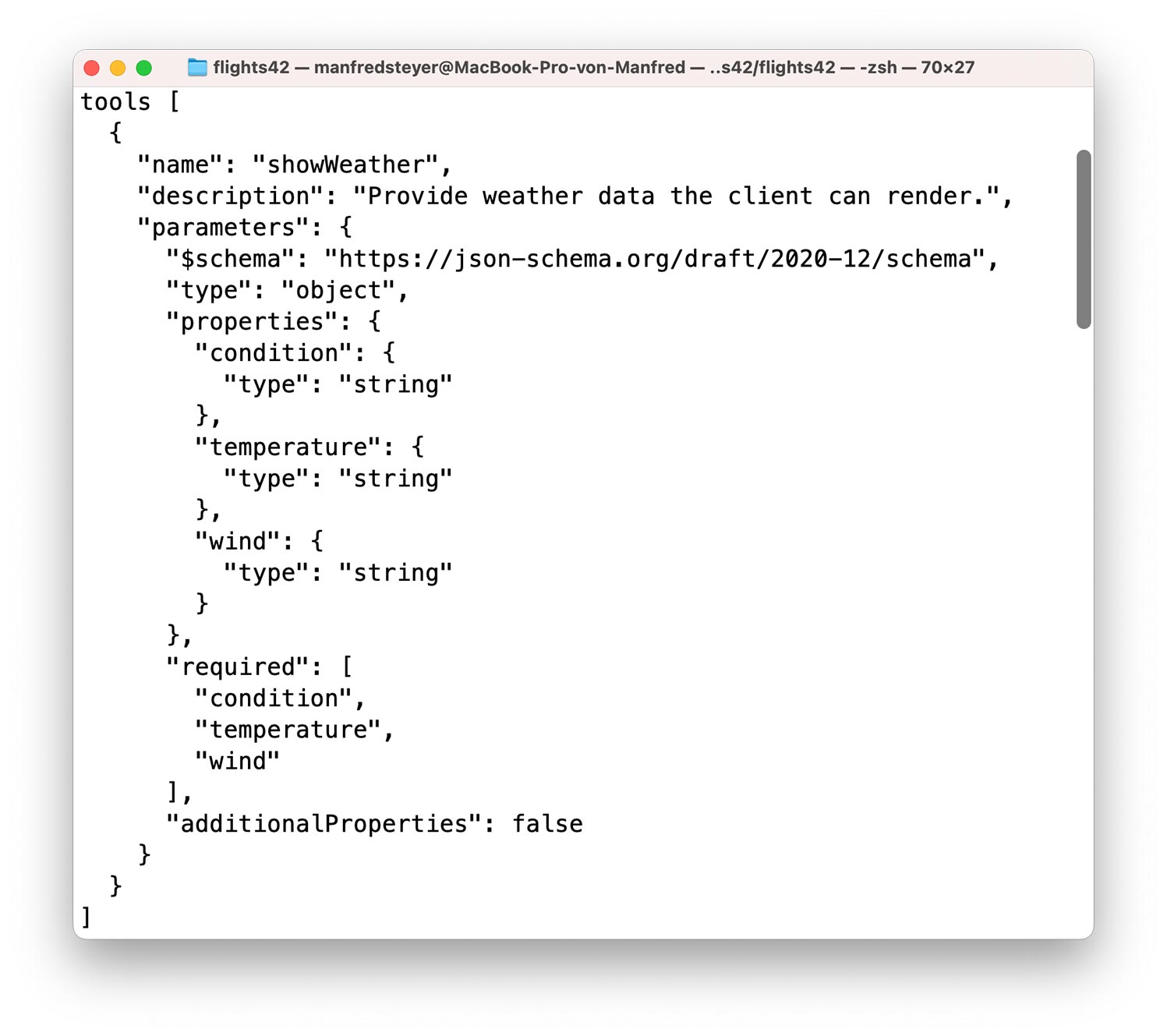
Fig. 3: JSON schema for client tools
Integration into Angular
The AG-UI SDK provides a solid foundation for integration into Angular. But you need an extra abstraction layer in order to use it conveniently, without unnecessary boilerplate code. The demo project contains this kind of abstraction in the libs/ag-ui-client folder. To simplify imports, the tsconfig.json file contains a path mapping @internal/ag-ui-client that points to it.
The linchpin of this implementation is an agUiResource for communicating with the agent. It also provides a WidgetContainer component that displays components requested by the agent, like the flight map shown at the beginning. The underlying API design is heavily inspired by the Hashbrown framework, which, from an Angular developer’s perspective, allows for an extremely idiomatic approach to working with LLMs, but currently doesn’t include AG-UI integration yet.
This article treats this abstraction as a black box that should eventually be provided by a library. Feel free to use the source code as a basis for your own projects.
By using AG-UI, the Angular example is independent of server-side technologies and models. To make execution as simple as possible, the demo application includes an agent that uses the extremely convenient TypeScript-based agent framework Mastra. Since the AG-UI SDK provides an adapter for Mastra, agents developed with it can be easily integrated via AG-UI.
The client has been tested with both OpenAI’s GPT-5 and Google’s Gemini 3. Details on setting up and running the demo can be found in the README.
Before you continue…
The reading list you'd build – if you had time.
The reads you'd find if you had time
Experts you can actually ask
Deep dives worth your weekend
Past conferences, ready when you are
Connecting agents via agUiResource
The agUiResource provided by @internal/ag-ui-client implements Angular’s Resource API and can be used similarly to the typical httpResource or rxResource (Listing 9).
Listing 9
import { defineAgUiComponent } from '@internal/ag-ui-client';

\[…\]

private readonly chat = agUiResource({

url: '<http://localhost:3001/ag-ui/ticketingAgent>',

useServerMemory: true,

tools: \[

findFlightsTool,

getLoadedFlightsTool,

toggleFlightSelectionTool,

getCurrentBasketTool,

displayFlightDetailTool,

createShowComponentsTool(\[

flightWidgetComponent

\]),

\],

});
The properties refer to the agent’s URL. With useServerMemory, the caller specifies whether the agent should save the chat history. If not, the client must repeat the entire chat history in every call.
In the tools list, the consumer registers all client-side tools that the agent is permitted to request. One special tool is showComponents, which is created via a factory. This factory accepts the description of possible components that the agent can integrate to answer questions. In our case, only a flight map (flightWidget) is available.
The individual tools can be described using the defineAgUiTool function (Listing 10).
Listing 10
import { findFlightsTool } from '@internal/ag-ui-client';

import { z } from 'zod';

\[…\]

export const findFlightsTool = defineAgUiTool({

name: 'findFlights',

description:

\`Searches for flights and redirects the user to the result\`,

schema: z.object({

from: z.string().describe('airport of departure'),

to: z.string().describe('airport of destination'),

}),

execute: async (args) => {

const store = inject(FlightStore);

const router = inject(Router);

store.updateFilter(args.from, args.to);

await router.navigate(\['/ticketing/booking/flight-search'\]);

},

});
Besides a name, a description, and parameter definitions based on Zod, the tool definition also includes an execute method. When the agent requests a tool, the agUiResource executes this method.
The parameter object args is of the TypeScript type defined by the Zod schema. In our case, this is an object with the properties from and to. The implementation shown triggers a flight search by passing these search criteria to the FlightStore and navigates users to the results page.
Tools that retrieve data-such as locally available states or user responses-can report this back to the model via the return value. An example of this is the getLoadedFlightsTool, which informs the agent about the flights that the application is currently displaying to the user (Listing 11).
Listing 11
export const getLoadedFlightsTool = defineAgUiTool({

name: 'getLoadedFlights',

description: \`

Returns the currently loaded/displayed flights\`

execute: () => {

const store = inject(FlightStore);

return store.flightsValue().map(toFlightInfo);

},

});
Components are defined in a similar way, but in this case the passed-in schema describes the available inputs (Listing 12). In this example, the flight property refers to another Zod schema (Listing 13).
Listing 12
import { defineAgUiComponent } from '@internal/ag-ui-client';

import { z } from 'zod';

export const flightWidgetComponent = defineAgUiComponent({

name: 'flightWidget',

description:

\`Displays a concrete flight as an interactive card. Use it when referring to one or more specific flights.\`,

component: FlightWidget,

schema: z.object({

flight: flightSchema,

status: z.enum(\['booked', 'other'\]).describe('Status of the flight'),

}),

});

**Listing 13**

const flightSchema = z.object({

id: z.number().describe('The flight id'),

from: z.string().describe('Departure city'),

to: z.string().describe('Arrival city'),

date: z.string().describe('Departure date in ISO format'),

delay: z.number().describe('Delay in minutes'),

});

To send a request to the agent, the client uses the _sendMessage_ method:

this.chat.sendMessage({

role: 'user',

content: 'Did I book my flight to France?'

});
Now the client just needs to display the response messages returned by the agent via the AG-UI in the chat history. The next section covers this.
Displaying the Chat History in the Template
The entire chat history is contained in the value of the AgUiResource. This is a signal that contains an array of AgUiChatMessages (Listing 14).
Listing 14
@for (message of chat.value(); track message.id) {

@if (message.content) {

<div>{{ message.content }}</div>

}

@for (widget of message.widgets; track widget.id) {

<app-widget-container \[widget\]="widget" />

}

@for (toolCall of message.toolCalls; track toolCall.id) {

<div>Tool Call: {{ toolCall.name }}</div>

}

}
In addition to a textual response (content), the iterated messages also contain a list of components (widgets) and tools (toolCalls). The widgets are components that have been registered for the showComponents tool and selected by the LLM. The WidgetContainer provided by _@internal/ag-ui-clien_t can dynamically generate these widgets and display them using the properties passed by the agent or LLM.
The toolCalls list provides information about the requested tools. Entries can refer to both client-side and server-side tools and are displayed here for transparency. We don’t need to worry about executing client-side tools however, since agUiResource handles this without any further action on our part.
The streamed AG-UI messages can be tracked using the browser’s Developer Tools (Fig. 4). This information makes the log accessible and aids troubleshooting.
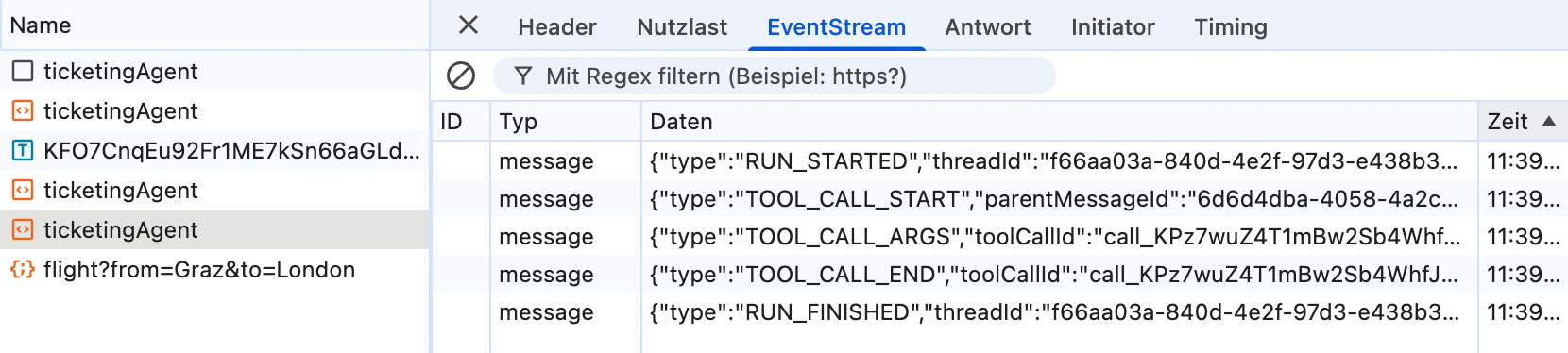
Fig. 4: AG-UI messages in the Dev Tools
Before you continue…
The reading list you'd build – if you had time.
The reads you'd find if you had time
Experts you can actually ask
Deep dives worth your weekend
Past conferences, ready when you are
Conclusion
AG-UI consistently decouples the frontend and agent via a clearly defined, message-based interface. This eliminates direct dependencies between the UI, backend, and LLM: tool calls, streaming, and UI updates are handled via standardized messages. It reduces complexity, facilitates the replacement of agent frameworks, and prevents vendor lock-in.
The existing SDK for TypeScript handles a large part of the integration work. It provides ready-made abstractions for runs, messages, and tool calls, as well as adapters for many existing agent frameworks. On the client side, this can be used to create lightweight, framework-specific wrappers that integrate AG-UI idiomatically without having to reimplement the protocol itself.